
SecurePoint Visitor
Visitor management you can actually see
Every screen below is the running product, not a mockup. Screen visitors against OFAC, BIS, UN, EU, and UK lists at check-in. Hold flagged records until someone authorized decides. Print an access-controlled badge, then export the whole visit as evidence.
Swipe to pan the screen
One visit, end to end
A visit moves through five steps, and each one leaves a record behind. Jump to any step to see the screen that handles it.
Read the transcript
At a defense plant or any regulated site, the front desk should know who is walking in, screen them, and keep a record of every decision.
A host invites their visitor ahead of time. When the visitor fills in their details, SecurePoint screens them against U.S. and international sanctions and restricted-party lists.
Once they're cleared, a QR code arrives by email.
At the lobby kiosk, they scan the code and their ID, take a badge photo, and sign the visitor agreement.
If a name looks like a possible match, the visit is held until a reviewer decides, and their reason goes on the record.
When everything checks out at check-in, the host gets an email that their visitor has arrived, and the front desk prints the badge.
Every check-in, screening result and decision is logged, so when an auditor asks, you can export the evidence.
SecurePoint Visitor. Screen visitors at check-in, and keep the decisions on record.
- 01
Pre-register
Hosts schedule the visit before arrival, so the lobby already knows who is coming.
- 02
Check in
Kiosk self-service or a front-desk operator, with ID and photo capture.
- 03
Screen and review
Sanctions screening at check-in; possible matches go to a documented review.
- 04
Approve and badge
The visit names what is still outstanding before a badge can be issued.
- 05
Preserve evidence
The visit, the screening, and the decision export together after checkout.
Pre-register and control the lobby
The front desk sees the day before it walks in
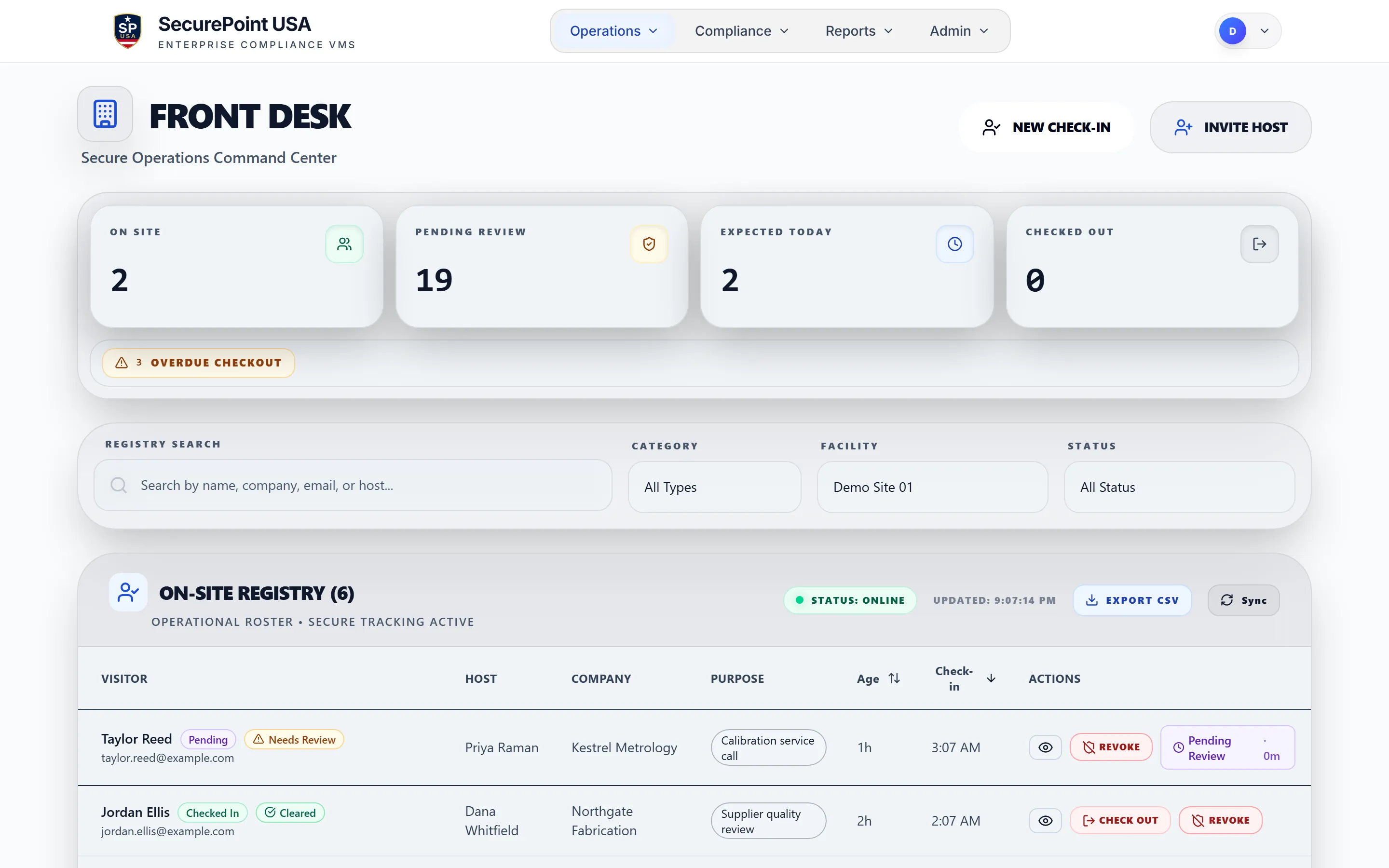
Hosts pre-register visitors ahead of arrival, so the lobby opens with a roster instead of a blank sign-in sheet. On-site visitors, expected arrivals, and anything waiting on a decision sit in one view, scoped to the site the operator is working.
- Expected arrivals and on-site visitors in a single roster, filtered by site.
- A visitor held for review is labeled in the roster, not buried in a separate tool.
- Staff surfaces follow the signed-in user’s light or dark preference.
Read the transcript
The front desk runs the day from one screen: who's on site, who's waiting on a review, who's expected today, and who has left.
Today's pre-registered visitors are listed ahead of time, and anyone past their expected time is flagged.
When a visitor checks in and is cleared, their host gets an email, and a text if texting is set up for that host.
At the end of the visit, the desk checks the visitor out, and the time and the staff member are recorded.
If someone has to be removed, the desk can revoke the visit with a reason. The visit closes, and the visitor is recorded as denied.
SecurePoint Visitor. Screen visitors at check-in, and keep the decisions on record.
Check in
Visitors check themselves in without holding up the lobby
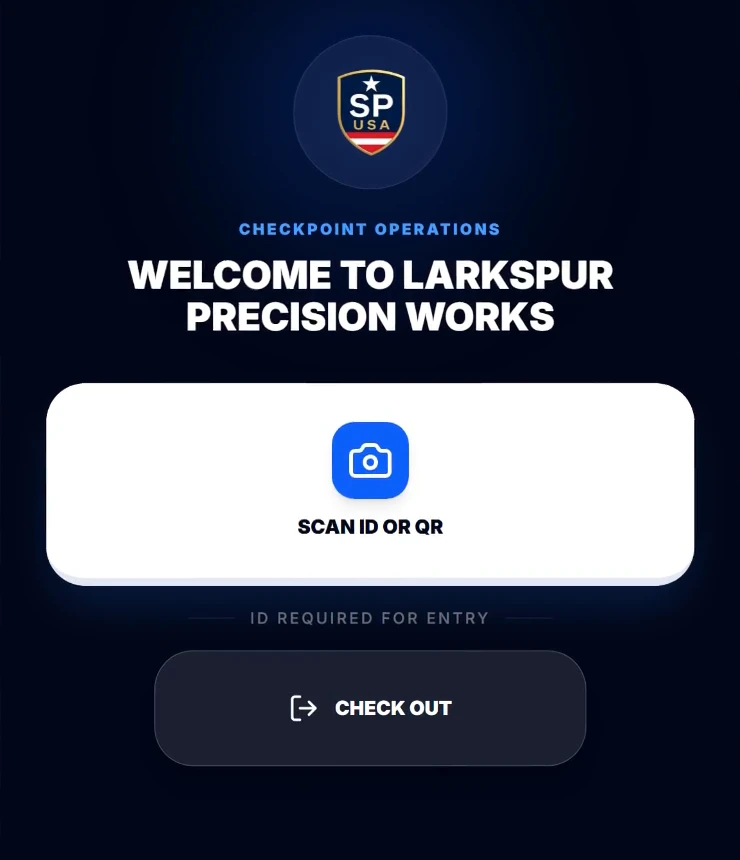
On a lobby tablet, the visitor walks a guided check-in: identity, purpose, host, and any documents the site requires. A pre-registered visitor can scan a QR code and skip straight past re-entering details.
- Guided self-service on a tablet, or the same flow driven by a front-desk operator.
- QR check-in for pre-registered visitors, manual check-in for walk-ins.
- Kiosk surfaces stay dark by design so an unattended lobby screen never changes appearance.
Kiosk routes are pinned to the dark theme in the product. There is no light kiosk, so there is no light kiosk screenshot here.
Screen and review
A possible match stops the visit, not the audit
Visitors are screened at check-in. A possible match does not quietly pass and does not get resolved at the front desk. The record moves into the compliance queue and stays there until an authorized reviewer records a decision.
- Screening runs against OFAC, BIS, UN, EU, and UK sources at check-in.
- A flagged record is held for review rather than cleared by lobby staff.
- The decision, the reviewer, and the reasoning are written to the append-only audit log.
Read the transcript
Visitors are screened against sanctions and denied-party lists, like OFAC's SDN list, the BIS Entity List and Denied Persons List, and the UN, UK and EU sanctions lists.
When a name comes back as a possible match to someone on a list, the visit is held. No badge can print until a person reviews it.
The case goes to the compliance queue, which shows how long each review has been waiting.
Open it to see exactly what matched: the listed name, the list it's on, and how closely the names compare.
Compare that with what you know about the visitor. Then record your decision and the reason: not a match, approve, deny, or send it for senior review.
The decision is saved with who made it and when, and the visit can continue.
SecurePoint Visitor. Screen visitors at check-in, and keep the decisions on record.
Approve and badge
The badge is gated on evidence, not on goodwill
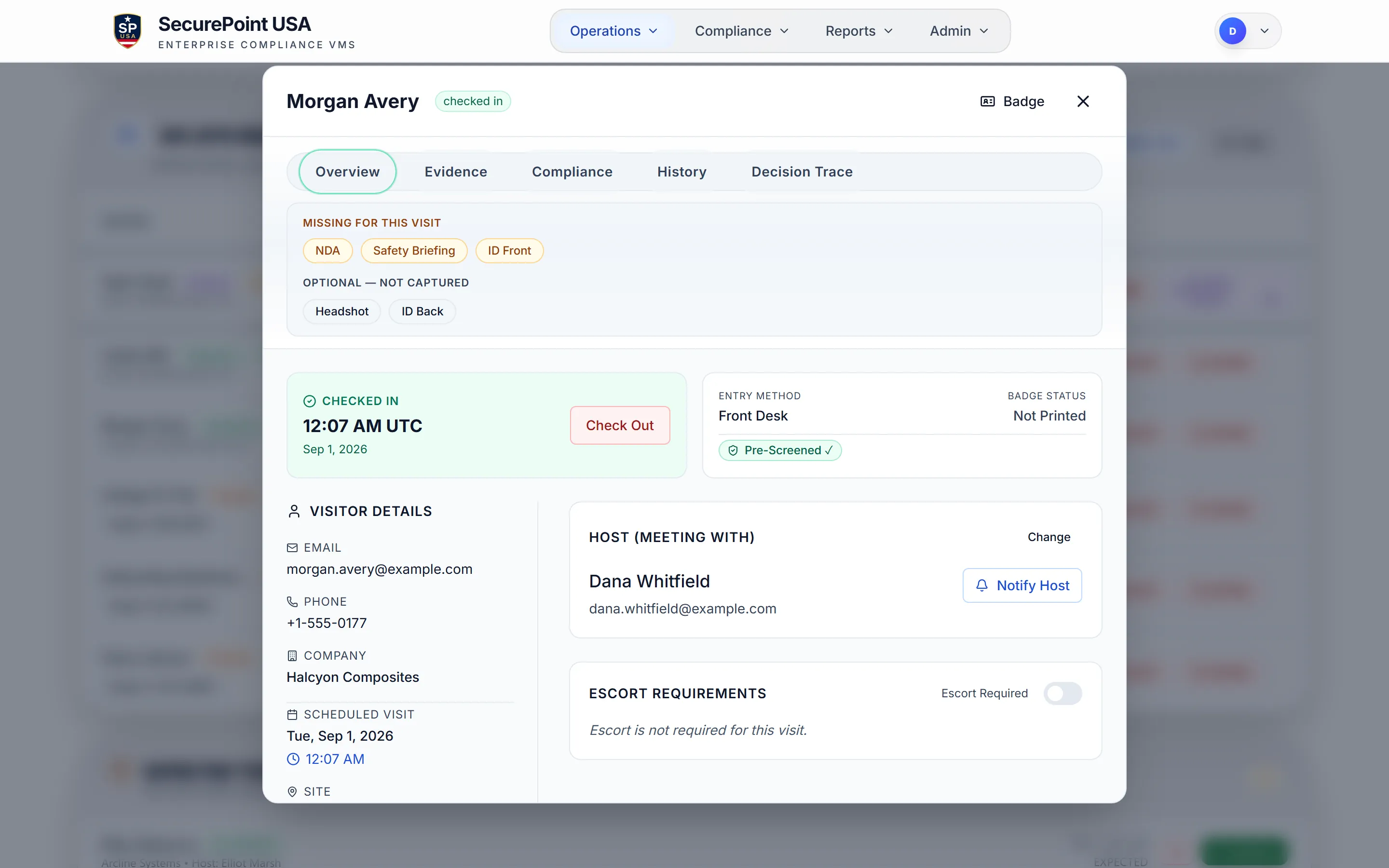
The visit record carries the host, the site, the purpose, and the escort requirement, and the badge reads from that record. The screenshot is a cleared, checked-in visitor who still cannot be badged: the visit names exactly what is outstanding, so nobody has to remember the site policy at the counter.
- Host, site, purpose, and escort requirement stay attached to the visit.
- Screening has to clear before the badge action opens at all.
- Outstanding NDA, safety briefing, and ID capture are listed on the visit and block badge issuance.
- Brother QL-820NWB printing runs from the SecurePoint Kiosk app on an iPad or Android tablet, the PC Print Connector, or the browser print dialog.
Optional items are listed separately from required ones, so a front-desk operator can tell a blocker from a nice-to-have without reading a policy document.
Read the transcript
Admins set up a badge template for each visitor type: the shape, a black or red stripe, and what the badge shows.
A print check confirms the layout fits the label before anything prints.
At the front desk, a badge is available once the visitor is checked in and cleared.
It carries their photo, company and host, the hours it's valid, and a QR code. At an export-controlled site, it also shows their screening and escort status.
It prints on a Brother QL-820NWB label printer. Finish in your browser's print window if one opens.
The visit record now shows the badge was sent to print.
At the end of the visit, they scan the badge's QR code at the kiosk to check out.
SecurePoint Visitor. Screen visitors at check-in, and keep the decisions on record.
Swipe to pan the screen
Preserve evidence
After checkout, the visit is already an exhibit
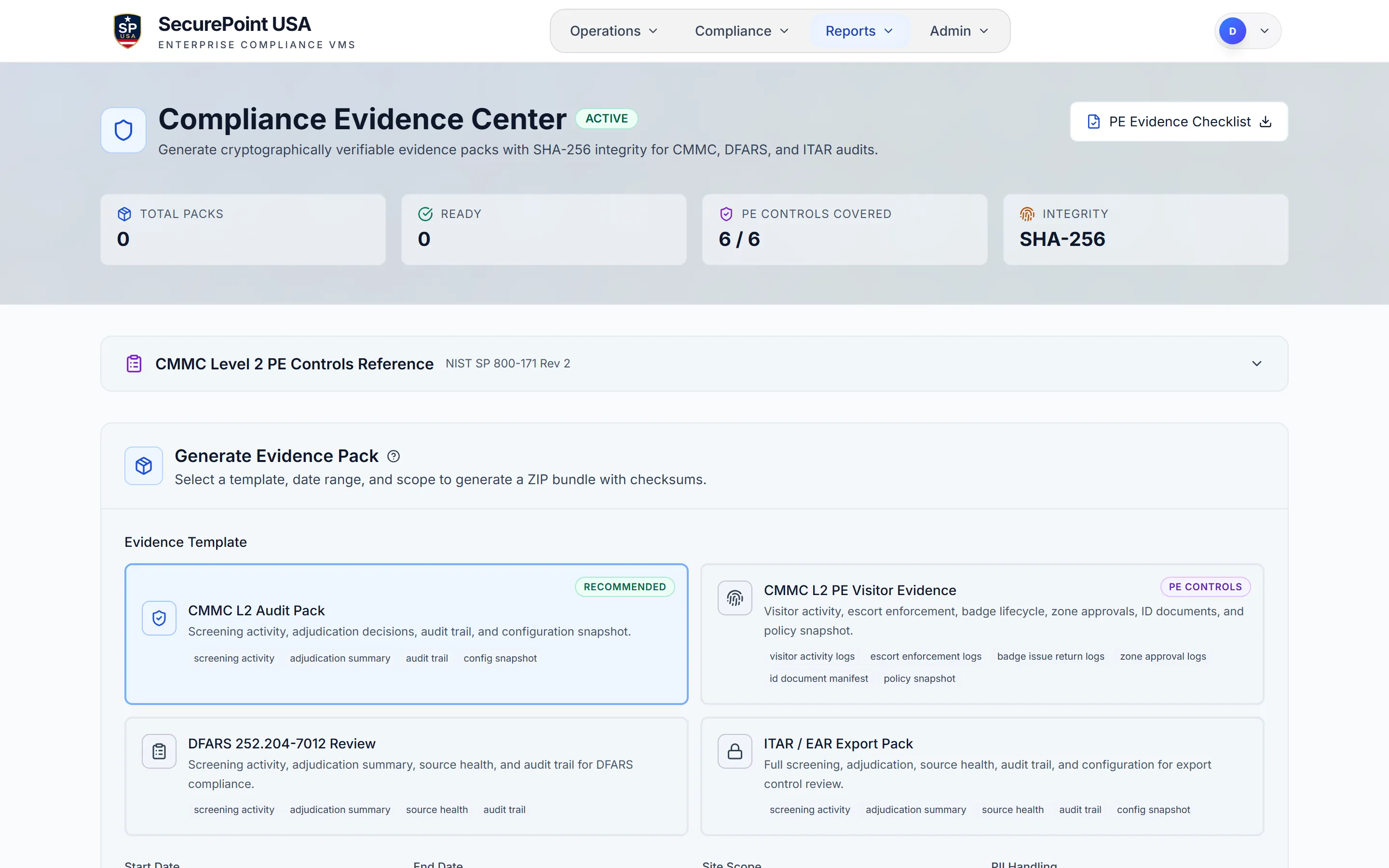
Assessors do not ask what your lobby does. They ask you to show it. Evidence packs assemble visit activity, screening results, adjudication decisions, and the audit trail into one export with SHA-256 checksums, scoped to the date range and sites you pick.
- Templates for CMMC Level 2, the CMMC PE visitor set, DFARS 252.204-7012, and ITAR/EAR review.
- Direct evidence for PE.L2-3.10.3 (escorts) and 3.10.4 (physical access logs), supporting evidence for 3.10.1 and 3.10.5, and partial evidence for 3.10.2. 3.10.6 is not addressed.
- Packs are built from real visit, screening, and decision records, not a summary page.
Read the transcript
When an auditor asks how visitors were screened, an admin opens the Evidence Center and picks a template and a date range.
SecurePoint builds a ZIP file with screening results, review decisions and audit records from that period, and its manifest lists an SHA-256 checksum for each file.
Evidence Pack History keeps each sealed pack, so a later download is the same file, with the same checksum.
The audit ledger shows who did what, and when: check-ins, screening results, reviewer decisions, and exports.
Users can't edit or delete ledger records, and exports from this page come with an SHA-256 checksum.
SecurePoint Visitor. Screen visitors at check-in, and keep the decisions on record.
Swipe to pan the screen
How-tos for the desk and for admins
Short, step-by-step videos for the people who run the lobby and set it up.
Finish missing check-in steps at the desk
Read the transcript
Step 1. Open the visitor's record. Missing for this visit lists what's left.
Step 2. Select NDA. Have the visitor sign it here, or send it to their phone and keep this window open.
Step 3. Select Safety Briefing. Have them watch it here, or send it to their device the same way.
Step 4. Select Headshot, capture the visitor's face, and save it for the badge.
Step 5. If you have ID Vault, select ID Front, then capture and save their ID.
Once nothing is missing for a cleared visitor, select Badge to open the preview.
Screen visitors at check-in. Keep the decisions on record.
Choose between Check Out and Revoke
Read the transcript
On the Front Desk Dashboard, Check Out and Revoke look alike, but do different jobs.
Step 1. When a visit ends normally, select Check Out.
Pick a reason, then select Confirm Checkout. The time and who did it are recorded.
Step 2. To remove someone, select Revoke. It's not an early check-out.
Revoke requires a reason. Keep it short, with no names, then select Revoke Access.
The visit ends, and the visitor is recorded as denied, with your reason.
Recent Activity tells them apart: Out for a check-out, Revoked for a revoke.
Screen visitors at check-in. Keep the decisions on record.
Set up NDA and safety documents
Read the transcript
Step 1. Under Compliance, open NDA and Safety. Leave the site blank for your whole organization.
Step 2. Give it a title that says NDA, then paste in the agreement text visitors will see.
Step 3. Upload your safety video as an MP4 or WebM file, or paste a YouTube link.
Step 4. Turn on both steps, then select Save Config.
At the kiosk, visitors sign the NDA, then complete the safety briefing. Their QR code check-in skips whichever they finished while registering.
Both are saved with the visit and shown on its Compliance tab.
Screen visitors at check-in. Keep the decisions on record.
Set up and assign a badge template
Read the transcript
Step 1. In Admin, open Badges, and Duplicate the template closest to what you need.
Step 2. In Quick Edit, name it, choose what the badge shows, and set text sizes.
For exact positions and sizes, switch to Advanced Design.
Step 3. Try a long sample name, and check that Preflight says Ready. Then select Save.
Step 4, for org admins. In Badge Assignments, choose it for a visitor type.
Nothing is live until you select Review Changes, then Apply Assignments.
Step 5. What Will Actually Print shows which template each site prints.
At the front desk, the contractor's badge preview shows the same template.
Screen visitors at check-in. Keep the decisions on record.
The rest of the visitor lifecycle
The tour covers the path a visitor walks. These are the pieces that keep working after they leave.
ID scanning and badge printing
Capture government-issued IDs at check-in and print badges carrying visitor type, site access indicators, photo, and expiration. Badge records link back to the visitor session.
Real-time sanctions screening
Screen every visitor against OFAC, BIS, UN, EU, and UK sources at check-in, with fuzzy name matching on the result.
Host Hub and arrival alerts
Hosts pre-register visitors, get notified on arrival, and manage escort assignments from their own portal without front-desk access.
Structured adjudication
Flagged screenings move into a review workflow with reviewer notes, escalation, and documented disposition history.
After-visit reports
Generate structured reports after checkout with screening results, host assignments, badge records, timestamps, and reviewer actions.
Append-only audit logs
Every visitor action is written to an append-only trail with a SHA-256 insert hash chain per organization. Records cannot be edited or deleted.
Hardware and deployment
Runs in an app or a browser. Prints on hardware you can service.
Check-in runs in the SecurePoint Kiosk app on an iPad or Android tablet, or in the browser on the tablet or desk machine already in the lobby. Get the SecurePoint Kiosk app from the App Store on an iPad, or from Google Play on an Android tablet. Both are available in the United States. Badge printing supports the Brother QL-820NWB from the SecurePoint Kiosk app, the PC Print Connector, or the browser print dialog. Bring equipment you own, or order supported hardware and label refills. Hosting, database, authentication, and file storage all run in a United States region, and we do not offer non-US data residency.
Who runs it day to day
Three groups touch the same visit record, and each one needs a different half of it.
FSOs and compliance
See foreign national visitors, screening history, and access decisions across sites. Export evidence for ITAR, EAR, DFARS, and CMMC reviews without rebuilding spreadsheets.
Front desk and security
Follow a guided check-in that never asks an operator to interpret a regulation. Policy stays with compliance; the lobby just needs the next clear action.
Operations and IT
Deploy per site with role-based access, SSO and MFA enforcement, and badge printing on hardware your team can service. Multi-site rollout without a separate install per lobby.
Frequently asked questions about SecurePoint Visitor
What is SecurePoint Visitor?
SecurePoint Visitor is a full-lifecycle visitor management system built for regulated facilities. It covers preregistration, ID capture, real-time sanctions screening, host coordination, badge printing, and append-only audit logging from lobby to checkout.
Which sanctions lists does SecurePoint screen against?
Core visitor workflows screen against OFAC, BIS, UN, EU, and UK sanctions lists at check-in. Defense teams can then review flagged records inside the adjudication workflow instead of splitting screening and decision-making across tools.
Does SecurePoint Visitor support ITAR and CMMC requirements?
Yes. SecurePoint Visitor provides foreign national identification, access-boundary badges, escort workflows, and append-only audit trails that support ITAR export control programs. For CMMC Level 2 it produces direct evidence for PE.L2-3.10.3 (escort visitors and monitor visitor activity) and PE.L2-3.10.4 (physical access logs), supports 3.10.1 and 3.10.5 without being sufficient for them on its own, contributes partially to 3.10.2, and does not address 3.10.6.
How does visitor badge printing work?
Badges are printed at check-in with visitor type, site-specific access indicators, host assignment, photo, and expiration. Badge records link to the visitor session and audit log for traceability.
What happens when a visitor is flagged during screening?
Flagged visitors are routed to a structured adjudication workflow. Authorized reviewers see the match details, AI-assisted context, and make a documented clear, hold, or deny decision. The decision and reasoning are recorded in the append-only audit log.
Can hosts preregister visitors?
Yes. Host Hub allows designated personnel to preregister visitors with details, trigger pre-arrival screening, and receive real-time notifications when visitors arrive. Hosts coordinate escort assignments without needing front-desk access.
Are the screenshots on this page the real product?
Yes. Every screenshot on this page is captured from the running SecurePoint Visitor application by a scripted capture workflow, using a synthetic demo organization with fictional visitor records. No customer data appears in any marketing asset.
Can front-desk staff use a light theme?
Yes. Staff-operated surfaces such as the Front Desk Dashboard and the compliance queue follow the signed-in user’s light or dark preference. Visitor-facing kiosk surfaces stay dark by design so an unattended kiosk always looks the same to every visitor.
How are audit logs stored?
All visitor actions are written to append-only audit logs with timestamps, actor identity, organization, and site. Logs cannot be edited or deleted. Evidence packs can be exported for ITAR, CMMC, DFARS, and internal compliance reviews.
Is there a per-screening fee?
SecurePoint visitor plans are sold on a per-site basis rather than a per-screening fee model. Buyers should review the plan and add-on structure during procurement, but the commercial story is fixed site pricing instead of metered screening charges.
Explore SecurePoint Visitor
Deep dives into specific compliance workflows, features, and technical whitepapers.
ITAR Visitor Management System
Full lifecycle visitor management with preregistration, ID capture, screening, host coordination, and audit reporting.
CMMC Visitor Logging
Visitor logs and audit trails that support CMMC Level 2 and DFARS 252.204-7012 evidence requirements.
Defense Contractor Visitor Management
How defense contractors use SecurePoint for multi-site visitor screening, ITAR/EAR controls, and CMMC-aligned logging.
Sanctions Screening
Multi-list sanctions screening across OFAC, BIS, UN, EU, and UK with fuzzy name matching.
After-Visit Reports
Link reports to specific visits for export control programs with structured data capture and audit-ready evidence.
CMMC Visitor Management Whitepaper
How visitor management maps to the CMMC Level 2 PE controls, and where it only supports them.
ITAR Visitor Screening Whitepaper
Systematic visitor screening workflows for ITAR foreign national access requirements under 22 CFR.
Free guide: CMMC Level 2 Visitor Management
- The six CMMC L2 Physical Protection requirements, quoted as NIST states them
- Requirement-by-requirement mapping, and which a POA&M cannot hold
- What assessors look for in physical-access evidence
Or get it sent to your inbox
Ready to see it on your own lobby?
Schedule a walkthrough. We will map SecurePoint Visitor to your current visitor workflows, compliance requirements, and facility layout.