
Link After Visit Reports Directly to Visitor Sessions
When a DCMA auditor asks about a foreign national visitor from six months ago (what technical data they accessed, what controlled technology they saw, whether export control exemptions applied), you need the complete record. SecurePoint USA links After Visit Reports directly to visitor sessions, screening results, and append-only audit logs.
Automatic Linking
Reports auto-linked to visitor sessions, screening results, and audit logs.
Structured Data Capture
Technical data access, controlled technology, and export control exemptions, all in one form.
Audit-Ready by Default
Every report timestamped and exportable as a complete evidence pack.
The Problem
Visitor documentation scattered across email threads, shared folders, and handwritten notes. No clear link between check-in records, host reports, and compliance evidence. Auditors ask questions you can't answer quickly.
The Solution
After Visit Reports submitted via HostHub.trade are automatically linked to visitor sessions and screening results. Search, export, and produce complete audit trails in seconds.
How It Works
Visitor Checks In
Visitor arrives and checks in at the kiosk or front desk. System screens against sanctions lists and creates a visitor session record.
Host Receives Report Request
After visitor checkout, host receives an email with a link to submit an After Visit Report via HostHub.trade.
Host Submits Structured Report
Host completes a structured form covering technical data access, controlled technology interactions, export control classifications, and any relevant notes.
Report Linked to Visitor Session
After Visit Report is automatically linked to the visitor session, screening results, and all related documentation. Complete audit trail available for compliance reviews.
Host Portal Integration
Hosts submit structured After Visit Reports via HostHub.trade, automatically linked to visitor sessions and screening results.
Export Control Tracking
Track technical data access, controlled technology interactions, and export control exemptions for ITAR and EAR programs.
Complete Audit Trails
All reports linked to visitor sessions, screening results, and append-only audit logs. Export complete evidence packs for compliance reviews.
Watch a foreign-person visit through to its report
Read the transcript
When the site requires it, a visitor who lists another country of citizenship acknowledges they're a foreign national, and that the visit may need an escort and more review.
The kiosk asks the visitor to wait for their host. The host gets an email asking them to come to the kiosk, check the visitor's photo ID, and print the badge. It also says the visit needs an escort.
At the kiosk, the host enters their name and confirms three things: they checked the visitor's nationality on their ID, they'll escort them at all times, and they won't share export-controlled technical data without authorization. Then the kiosk prints the badge.
When the visitor checks out, the host is asked for an after-visit report: whether any controlled technical data was shared, and a short summary. If it's late, reminders follow.
SecurePoint Visitor. Screen visitors at check-in, and keep the decisions on record.
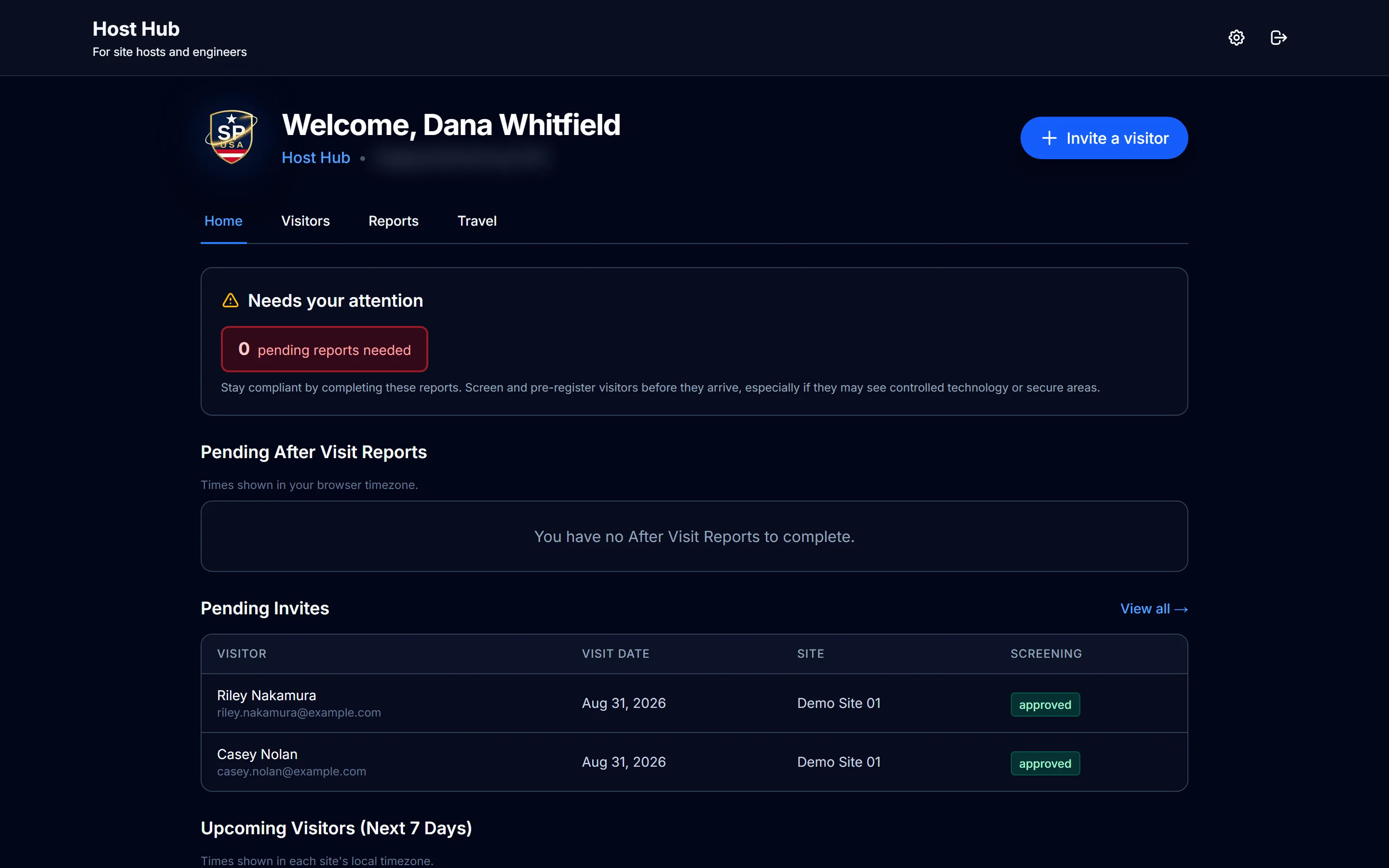
Where hosts file their reports
After checkout the host gets a link to this portal. Outstanding reports sit at the top, so what is missing is visible rather than remembered.
Swipe to pan the screen
Report Capabilities
Every After Visit Report captures structured compliance data and links it to the visitor session for a complete, audit-ready chain of custody.
Session-Linked Reports
Every report tied to a specific visitor session with check-in time, screening results, and host identity.
Structured Data Capture
Guided forms for technical data access, controlled technology, export classifications, and follow-up actions.
Fast Data Retrieval
Search by visitor name, date range, host, or export control classification. Pull complete records in seconds.
Evidence Pack Export
Export visitor record, screening results, After Visit Report, and all documentation as a timestamped evidence pack.
Compliance Proof
Demonstrate that your visitor control program tracks foreign nationals and documents technical data access as required.
Append-Only Storage
All reports are stored in append-only audit logs. 10-year audit log retention. ID image retention is configurable by policy and plan.
Connected Capabilities
ITAR and EAR Workflows
Export control workflows that capture policy checkpoints and reviewer actions required for ITAR and EAR compliance evidence.
Audit Logs and Evidence Packs
Append-only audit logs with structured evidence packs for CMMC, DFARS, and export control compliance reviews.
Sanctions Screening
Multi-list screening across OFAC, BIS, UN, EU, and UK with fuzzy name matching and unlimited screenings on every plan.
Ready for audit-ready After Visit Reports?
See how SecurePoint USA links After Visit Reports to visitor sessions, screening results, and append-only audit logs for complete export control documentation.
Request a demo and we'll walk your team through a typical visitor workflow.
Frequently asked questions
What is an after-visit report for?
It closes the loop on what actually happened during a visit: what was discussed or accessed, and anything the host needs to record. On its own a check-in record shows that someone entered; the report shows what the visit was.
Who files it?
The host. After checkout they receive a link to their own portal, where outstanding reports stay visible until filed.
Is the report linked to the rest of the visit record?
Yes. Reports are linked to the visitor session, so the report, the screening result, the decisions and the audit trail are retrievable together rather than reassembled from separate systems.
Can reports be exported for a review?
Yes, for the date range and sites you select, alongside the rest of the visit evidence.