Higher education's OFAC exposure spans every department that touches money
Six distinct OFAC risk categories in higher education
International student tuition
F-1 and other international students, along with their financial guarantors listed on I-20 documents, must be screened at enrollment and re-screened when lists update.
Research grants from foreign sponsors
Sponsored programs offices must screen foreign government agencies, private companies, and overseas research institutions before executing grant agreements.
Foreign gifts and endowment contributions
International donors (individuals and sovereign funds) must be screened before gifts are accepted. Federal reporting requirements for foreign gifts over $250,000 exist alongside OFAC obligations.
Visiting faculty and exchange scholars
Visiting professors, postdoctoral researchers, and exchange scholars receiving stipends or compensation must be screened at the time of appointment.
Study abroad and exchange partnerships
Partner universities, program operators, and host institutions in exchange programs may be in sanctioned jurisdictions. Contractual counterparties require screening.
Technology transfer and licensing
Companies licensing university intellectual property, particularly in dual-use technology areas, require screening against OFAC SDN and BIS Entity List.
A cross-departmental screening program built for higher education
Each administrative office screens the parties it works with, and a consolidated dashboard gives the compliance office visibility across all queues.
Student accounts: screen at enrollment and before each semester
Screen international students and their named financial guarantors when applications are received, before enrollment is confirmed, and before each semester's tuition is processed.
Sponsored programs: screen before grant agreements are executed
Screen all foreign grant sponsors, overseas sub-awardees, and co-principal investigators before sponsored program agreements are signed and funds are accepted.
Development office: screen donors before gifts are processed
Screen international donors before acknowledging or processing gifts. For major gift prospects, screen before solicitation meetings to avoid developing a relationship with a blocked person.
Compliance office: monitor continuously and review alerts
Continuous monitoring re-screens all active parties when sanctions lists are updated. The compliance office reviews flagged results, documents decisions, and coordinates licensing assessments where appropriate.
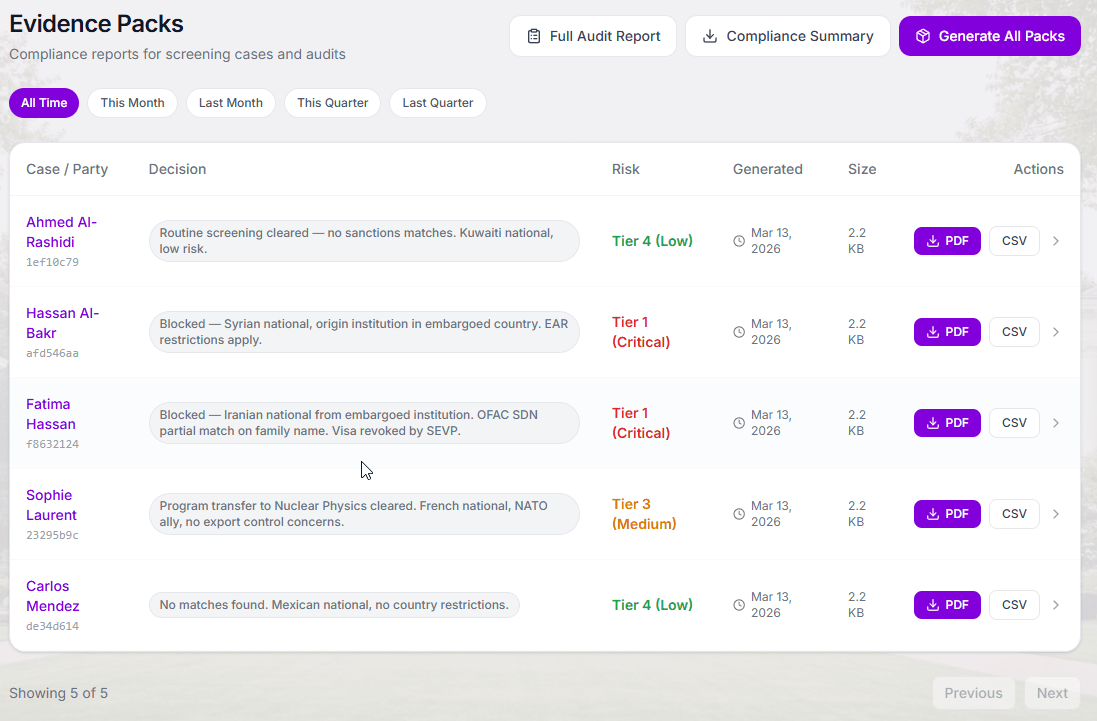
Evidence Packs for Universities
Audit-ready documentation for every department and every screening
Each screening generates a self-contained evidence pack with the result, decision, reviewer identity, and regulatory citations, ready for auditor requests or board review.
- Separate evidence records by department, campus, or transaction type
- Compliance officer dashboard with cross-department visibility
- Bulk export for annual compliance reporting
- Immutable audit trail with timestamps and reviewer identity
OFAC compliance for colleges and universities: FAQ
Common questions from university compliance officers, sponsored programs directors, and business officers.
Related Resources
Education compliance resources
Screening International Students
Detailed workflow for F-1 and J-1 students, financial guarantors, and I-20 sponsors.
Learn moreOFAC Screening for Schools
The foundational enforcement overview: why OFAC applies to all educational institutions.
Learn moreSponsor & Donor Screening
Due diligence for endowment gifts, major donations, and research grant counterparties.
Learn moreOFAC Licensing Paths
Licensing options when a student or research partner triggers a match.
Learn moreEducation White Paper
The comprehensive guide to OFAC sanctions compliance for higher education.
Learn morePlans & Pricing
Enterprise plans with multi-campus support and a dedicated CSM.
Learn moreA university-wide OFAC program built in days, not months
Role-based access for each department. Consolidated compliance dashboard. No IT integration required.